
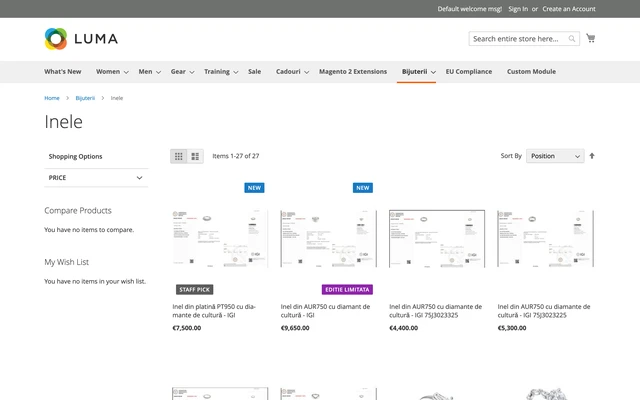
Product Labels & Badges for Magento 2
SKU: magendoo-product-labels
- Instant access after order confirmation
- Open source — MIT licensed
- Free updates included
- Professional support available
Need help?
Contact our support team for product questions.
Instant Download
After payment
MIT Licensed
Use in any project
Secure Payment
SSL encrypted
Support Included
With every purchase
Product Labels for Magento 2
Product labels ("Sale", "New", "Staff Pick", …) rendered as badges on category listings, search results and product pages, exposed in GraphQL, and driven by a first-class label entity with a stable code — not by ad-hoc attribute options.
Key Features
- Label definitions with admin grid and form — code, name, text, colors, corner position, per-placement visibility (listing / product page), priority, active flag. Managed under Marketing → Promotions → Product Labels.
- Stable label codes — every label has a stable
code(e.g.sale,new-arrival) that stays identical across environments; integrations never depend on numeric IDs. - Store-view text overrides — translate label text (e.g. "Sale") per store view.
- Manual assignment — a Product Labels multiselect on the product form (Product Details section, global scope) that the module never writes, so rule recalculations can never overwrite a merchandiser's selection.
- Two built-in computed rules — New products (active Set Product as New window) and On sale (active special price window), recalculated by a real Magento indexer (
magendoo_product_labels) with MView change tracking. In Update-by-Schedule mode product edits are picked up incrementally by the standardindexcron group — no custom cron. - Materialized storefront reads — manual and computed assignments never share storage; rendering a listing costs two indexed lookups for the whole page, with no rule evaluation in the render path.
- Luma rendering — badge overlay on category listings, search results and product pages; four corner positions, stacked when several labels share a corner.
- GraphQL support —
magendoo_labelson every product in theproductsquery (code, text with override applied, colors, position, priority), with a batched resolver: one preload serves every product in the query. - Full-page-cache correct — label edits flush exactly the affected pages via cache identities; assignment changes flush the affected products' pages.
- Extensible rule matchers — DI-registered; implement
MatcherInterfaceand register a new rule-type key to add custom computed rules (developer-level extension point in Release 1).
Configuration
- Enable Labels (store view) — render label badges on the storefront for this scope. Default: Yes.
- Maximum Labels Per Product (store view) — highest-priority labels win; 0 means unlimited. Default: 2.
A product's storefront labels are the union of its manual and computed labels, filtered by placement, ordered by priority, and capped by Maximum Labels Per Product.
Honest Limitations (Release 1)
- On sale detects special prices only — catalog-price-rule discounts are not detected (planned for a later release).
- Labels are text badges; image/shape labels are not part of Release 1.
- Cart, mini-cart and checkout placements are not part of Release 1.
Requirements
| Requirement | Version |
|---|---|
| Magento Open Source / Adobe Commerce | 2.4.x (magento/framework ≥ 103) |
| PHP | 8.2, 8.3 or 8.4 |
Free & Open Source
Licensed under OSL-3.0. Install from Packagist:
composer require magendoo/module-product-labels
Source code, issues and documentation: github.com/magendooro/magento2-product-labels
Compatibility & Installation
- Magento: Open Source / Adobe Commerce 2.4.x (
magento/framework≥ 103) - PHP: 8.2, 8.3 or 8.4
- License: OSL-3.0
composer require magendoo/module-product-labelsLast updated: July 2026 · v1.1.0